
Here’s something nobody talks about: your payroll provider doesn’t understand staffing.
They built their payroll software for companies with predictable headcounts and workers who stay in one location. But that’s not your business.
You place workers at different locations, yet your payroll solution calculates taxes like everyone lives at headquarters. You’re stuck paying for 500 workers in the payroll system when only 200 actually worked this week. Every Friday, someone on your team spends hours exporting CSVs from your ATS, reformatting data, and hoping nothing breaks. And when something does break, you’re on hold with a 1-800 number, explaining staffing to someone reading from a script.
That gap between how staffing operates and how payroll was designed creates constant friction.
The agencies pulling ahead aren’t tolerating that friction. They’re investing in payroll tools built specifically for staffing. This guide examines what’s actually broken in staffing payroll, what workers and staffing leaders are demanding based on real conversations, and how to choose payroll software that gives you a competitive edge instead of just checking compliance boxes.
The realities of payroll for staffing companies
“Payroll can be a super scary beast,” one staffing agency owner told us. In most industries, payroll is a recurring task. But for staffing, it’s a moving target. You’re paying a nurse who works in two different states, and needs money today because weekly pay “doesn’t cut it anymore.”
Simply put, staffing payroll operates under a different set of rules.
Workers move across jurisdictions constantly
An associate might work shifts in Pennsylvania, New Jersey, and New York in the same week. Each shift has different overtime rules, tax requirements, and leave policies. Your payroll software needs to calculate taxes and compliance at the shift-location level, not based on where the worker lives or where your company is headquartered.
Pay rates change by shift
The same person might earn $35/hour for a day shift, $42/hour for nights, and $50/hour for a weekend shift, all in the same pay period. Most traditional payroll software assumes one rate per employee, forcing staffing agencies into manual workarounds.
Pay speed is recruiting
According to Everee’s research, 68% of healthcare workers would choose a job that paid them within 24 hours over one that didn’t. And 41% of manufacturing, logistics and construction firms now offer same-day pay. When your competition and clients are offering daily pay and you’re stuck on weekly cycles, you’re not competing on equal footing.
Cash flow is always tight
Your clients might pay on 30, 45, or 60-day terms, but your workers expect to be paid this Friday. Traditional payroll companies don’t care about your working capital problems; they expect you to front everything or work with third-party factoring companies to bridge the gap.
Your workforce fluctuates constantly
You might have 500 people in your system but only 200 working this week. Traditional payroll companies charge you for all 500. Or they make you “unhire” and rehire workers just to manage costs, creating a ridiculous administrative burden.
Systems don’t naturally connect
Every week, someone on your team exports timesheets from your ATS, reformats columns to match your payroll system, manually verifies pay rates, and uploads everything hoping nothing breaks. One spreadsheet error means someone doesn’t get paid correctly.
“Time collection is one of our biggest pain points. Every client does it differently, and it creates chaos on our end,” one staffing agency told us. This manual bridge between systems is tedious and full of opportunities for costly mistakes.
Staffing company payroll software: what’s not working
Legacy payroll software was built for corporate America, not today’s staffing agencies. On paper, the current system “works.” But under the surface, your team is stitching things together every single week by exporting time, double-checking rates, fixing state setups—all while fielding worker complaints about delays.
None of it feels catastrophic. It just feels heavier than it should. And that weight compounds when you’re trying to scale. Staffing company payroll software runs into challenges most payroll systems were never built to handle.
Inflexible pay cycles
Most systems run on two-day ACH with fixed pay schedules. This means you’re scheduling payroll days in advance and frustrating workers who increasingly expect faster pay. “Same-day pay is a value benefit for candidates,” one healthcare staffing agency told us. When workers can drive for DoorDash and get paid today, waiting until Friday feels outdated.
One-size-fits-all time tracking
Staffing companies need timesheet verification from their back office and the client. You need to handle shift differentials, multiple pay rates in the same period, and time corrections without creating a compliance nightmare. Legacy systems force you into clunky CSV exports and manual data manipulation. As one agency said: “Time collection is one of our biggest pain points. Every client does it differently, and it creates chaos on our end.”
Location-blind compliance
Most payroll systems default to taking out state and local taxes based on the worker’s home address or your agency’s location. But the actual rule is simple: taxes are calculated where the work is done. If your staffing payroll isn’t calculating compliance at the shift-location level, you’re exposed.
Painful payroll corrections
In staffing, corrections happen. A lot. Clients catch timesheet errors, workers take shifts at the wrong rate, or approvals get missed. Legacy payroll makes fixing these mistakes unnecessarily complex, often requiring ticket-based support or manual journal entries. Your team needs the ability to quickly adjust over- and under-payments while maintaining compliant audit trails.
Payroll pricing ignores variability
Legacy payroll charges per worker for every worker in your system, whether they worked this month or not. For staffing agencies managing hundreds of workers with fluctuating schedules, this adds up fast. As one agency owner said: “ADP charges me even for people who don’t work that week.” Ouch.
Earned wage access (EWA) and pay cards solve only part of the problem
As gig work gained traction, faster payment tools followed. Earned Wage Access apps offered early access to wages. Instant pay cards promised money in minutes instead of days. On the surface, both feel like progress. But both stop short of real payroll infrastructure.
EWA for staffing companies
EWA apps have a great pitch: let workers access their earned wages before payday. The reality is that workers can request a portion of their earnings early (usually for a fee), and it still requires them to wait for the “official” payday for the full amount. It’s a loan against wages instead of true daily pay.
“Workers want money today, or they’ll find someone who gets it,” one staffing leader told us. When 83% of young workers want to earn their wages after every shift or work day, EWA doesn’t solve the core problem. You’re still running on outdated pay cycles, and workers still have to actively request advances. Plus, if the EWA solution isn’t integrated with your payroll software, it’s an additional vendor relationship your team has to manage.
Pay cards for staffing and recruiting
Some agencies try to speed up payments with instant pay cards, and pay cards can work well if they’re bolted on as an afterthought. When pay cards come from a separate vendor, workers must navigate yet another app, another login, another system. And critically, pay cards alone aren’t legally compliant for W-2 workers unless you offer direct deposit as an option.
What staffing agencies actually need is payroll software that offers flexible payout methods as part of the same system. Same-day ACH when workers want money in their bank accounts and instant pay cards when they want it immediately.
Best payroll software for recruitment agencies
If you search for the best payroll software for recruitment agencies, you’ll find no shortage of vendor lists and feature grids. But staffing payroll operates under a fundamentally different set of demands than traditional payroll systems. Before comparing brand names, pricing tiers, or flashy features, you need a clear evaluation framework rooted in how recruitment agencies actually run.
The criteria that follow aren’t pulled from a feature checklist or a sales deck. They come straight from conversations we’ve had with staffing owners, operators, and finance leaders—the people in the trenches who deal with payroll when something goes wrong. Their frustrations, trade-offs, and day-to-day realities shape what “best” actually means in staffing payroll.
1. Support that actually understands staffing
“If someone doesn’t get paid, it falls on me, and I just need a system where I can set it, forget it, and trust that it works.”
That quote, from a nursing staffing agency owner, captures the fundamental problem with legacy payroll support models. When something breaks, you call, listen to hold music, and eventually talk to someone reading who’s never worked in staffing. This support model works fine for companies with simple, predictable payroll needs. It’s a disaster for you.
There are four key areas recruitment agencies should evaluate when choosing payroll software.
Dedicated support representatives
Not a rotating cast of ticket handlers, but actual people assigned to your account who learn your business. “Having a dedicated rep who knows our unique situation is huge,” one agency told us.
Fast response times with accountability
Look for providers who commit to response times (30 minutes is standard for specialized staffing payroll) and deliver. When payroll is Friday and it’s Thursday afternoon, “we’ll get back to you in 1-2 business days” isn’t acceptable.
Proactive guidance, not reactive problem-solving
The best payroll partners don’t just fix problems—they help you avoid them. They reach out when they see potential compliance issues, suggest workflow improvements, and share what’s working for similar agencies.
Implementation support that actually onboards you
“We want confidence that the migration will be smooth,” is something every switching agency says. Look for providers who handle data migration, help your team get trained, and stick around during your first few payroll runs.
For example, Everee assigns dedicated onboarding and support representatives to every staffing agency. When you call, you talk to someone who knows your business, has reviewed your account, and can solve problems on the spot—not read from a script or route you to another department.
The difference shows up in the details. One healthcare staffing agency told us: “Our current provider’s ticketing system is a nightmare. When we need help, we need it now, not in two days.” After switching to a provider with dedicated support, they reported: “This is exactly what we’ve been looking for, real people who understand our business and respond fast.”
2. Enhanced onboarding that removes friction
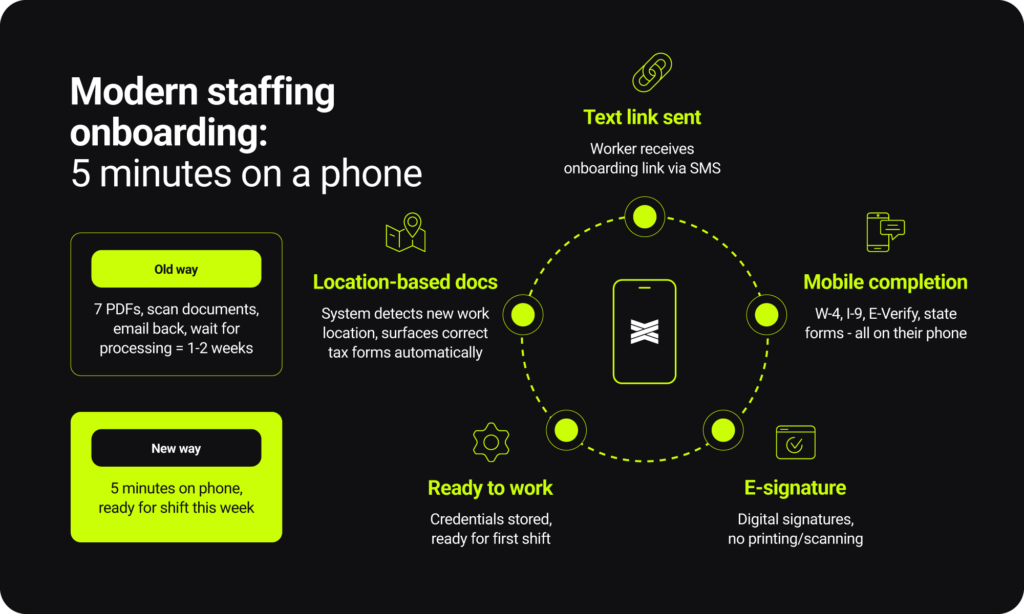
Worker onboarding is where staffing agencies lose candidates. You’ve done the hard work of recruiting someone, they’ve agreed to work for you, and then you hit them with: “Fill out these seven PDFs, scan your documents, email everything back, watch this video, and wait for us to process it all.”
Meanwhile, your competition has them working tomorrow because their onboarding takes five minutes on a phone. To compete at that speed, your payroll platform’s onboarding needs specific capabilities designed for staffing.
Mobile-first experience
Your workers aren’t sitting at desks. They’re getting onboarded between shifts, in hospital parking lots, or while their kids are at soccer practice. Onboarding needs to work perfectly on phones, with clear instructions and minimal typing.
E-Verify integration
For staffing agencies that operate in certain states, E-Verify is table stakes. Your onboarding system should handle Form I-9 and E-Verify verification automatically, flagging issues before someone shows up for their first shift. Look for platforms that integrate directly with E-Verify rather than requiring you to use a separate system.
Remote I-9 verification options
Post-pandemic, remote I-9 verification has become critical, especially for agencies staffing across wide geographic areas. The rules can be complex (involving authorized representatives or acceptable alternative procedures), but the right payroll provider should offer compliant remote I-9 workflows. Some platforms even support peer-to-peer verification where workers can use notaries or other authorized individuals in their area.
Personalized document packages by role and location
Not every worker needs the same paperwork. Your California workers need different forms than your Texas ones. Your 1099 contractors need W-9s, not W-4s. Good onboarding systems let you create custom document packages that automatically adapt based on worker type, location, and role.
Automatic form triggering based on location changes
Here’s a detail that matters: when a worker who lives in Maryland picks up their first shift in Virginia, they need Virginia tax forms. The system should detect this automatically and prompt them to complete the right paperwork. “When someone works in a new state, they need to get the new tax forms right away. We can’t afford delays in getting them paid,” one staffing agency told us.
Document storage with easy access
Workers lose their paperwork. Clients ask for credentials. You need onboarding and payroll systems that store everything (certifications, licenses, I-9s, background checks) in one place where both you and the worker can access it anytime.
When onboarding moves at the speed of staffing
When a dental staffing agency was evaluating payroll providers, one requirement stood out: “We need workers ready to work faster with custom workflows.” They wanted to text onboarding links to dental hygienists, have them complete everything on their phone in a few minutes, and be ready for their first shift that week, not two weeks later after paperwork finally got processed.
After implementing proper onboarding workflows, one agency reported: “We’re managing everything that used to be manual. The ability to text onboarding links to workers and have them self-complete everything on their phone has been huge.”
One event staffing company specifically needed “flexible onboarding with market-specific documents and e-signatures” because they operate across markets with varying compliance requirements. Their solution needed to automatically surface the right documents based on where a worker was being deployed, without manual intervention from their team.
For platforms like Everee, this means providing embeddable onboarding components that can live inside your ATS or app, custom document packages that adapt based on worker classification and location, and automated workflows that handle state tax forms, E-Verify, and compliance requirements without your team touching any of it.
3. Multi-state and multi-jurisdiction compliance that actually works
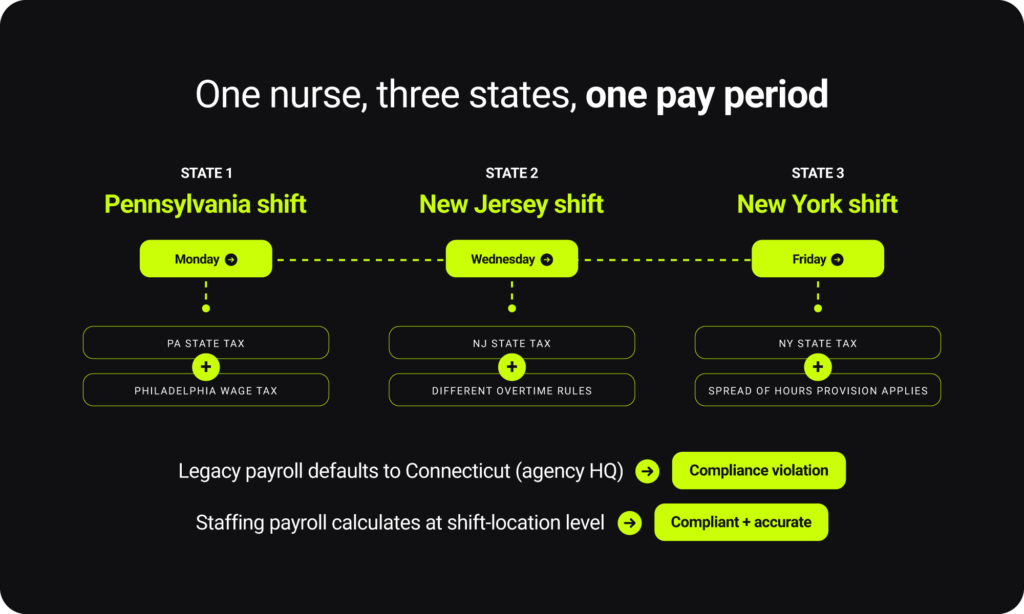
Legacy payroll providers know multi-state is a problem for staffing. Over the last few years, most have tried to patch it. They’ve added multi-state tax tables. They’ve bolted on local tax modules. Some let you assign a “work state” in an employee profile. It’s a step in the right direction. But for staffing and recruitment agencies, it’s not enough. A staffing-grade payroll platform is defined by five critical standards.
Shift-level location tracking and tax calculation
Your system needs to let you set a specific location for each shift, then automatically calculate taxes based on where the work happened.
Automatic jurisdiction recognition
When you assign a shift in Philadelphia, the system should know about Pennsylvania state tax, Philadelphia wage tax, and school district tax, and calculate all of them correctly. “When a nurse changes states mid-week, tax setup becomes a pain. We need that automated,” one agency told us.
Multi-state overtime compliance
Your payroll solution should understand varying state and local overtime rules and apply them correctly when workers take shifts in multiple locations.
Leave policy management by location and worker group
You need the ability to create custom leave policies for different states, cities, and worker classifications, and have them automatically apply based on where someone is working. One staffing platform mentioned they needed “unlimited custom policies for different worker groups.”
Audit-ready reporting
When states audit your tax compliance (and they will), you need reports that show exactly where each worker worked, what taxes were calculated and why, and proof that everything was filed correctly. Clean audit trails aren’t optional.
4. Real integration with your tech stack (not just API access)
When your ATS, time tracking, and payroll systems are integrated, there’s one place where worker information lives. Update someone’s pay rate once, and it flows everywhere. Add a new worker, and they’re automatically created in payroll. One system, one truth.
Many payroll companies will tell you they “integrate” with ATS platforms or time tracking systems. What they mean is: they have an API, and theoretically someone could build an integration. But that’s not the same as actual, working integration that staffing agencies can use today. When evaluating integration, focus on the capabilities that actually remove manual work and keep your systems aligned.
Pre-built integrations with leading staffing platforms
Does the payroll provider already integrate with LaborEdge, Bullhorn, Tracker, NextCrew, ActivateStaff, StaffingOS or other platforms you’re already using? Pre-built integrations mean faster setup and less technical work.
Two-way data sync, not just one-way export
Real integration means data flows both directions. When you update a worker in your ATS, it updates in payroll. When payroll processes, the payment data flows back to your ATS for tracking. One healthcare agency specifically called out their need for “bi-directional integration so finalized timesheets flow straight into payroll without double entry.”
Embedded components, not just separate systems
The best integrations let you embed payroll functions directly into your existing platform. Workers complete onboarding inside your ATS. They view pay stubs inside your app. They don’t even know they’re using a separate payroll system because it’s seamlessly built into your experience.
API documentation and sandbox access for custom builds
If you’re building a platform or have custom needs, you need more than basic integration. Look for providers with strong API documentation, sandbox environments for testing, and developer support.
Common integration scenarios in staffing
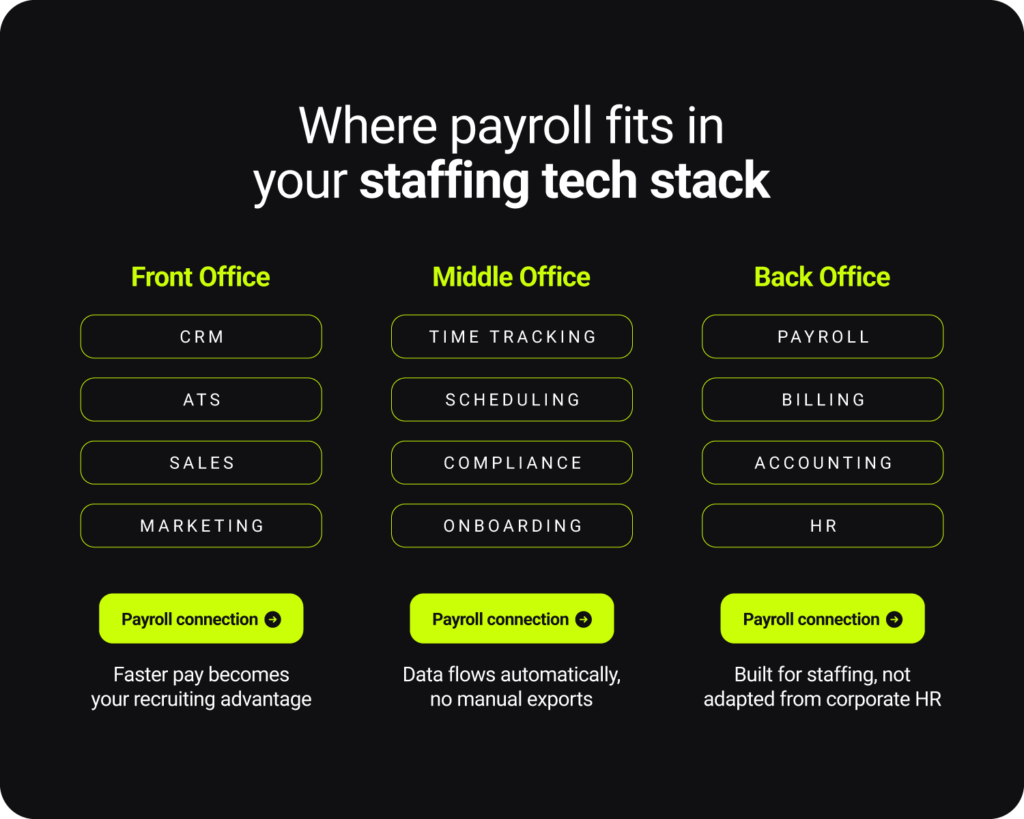
ATS to payroll sync
When you onboard a new worker in Bullhorn or LaborEdge, they’re automatically created in payroll with all their information. When they’re assigned shifts, that data flows to payroll. When you update their information, it syncs everywhere.
Time tracking to payroll automation
Whether you’re using LaborEdge’s time module, StaffUp, NextCrew, Deputy, or another time tracking platform, hours should flow directly into payroll. No exports, no reformatting, no manual data entry. “Right now I need to export information from my ATS, go into payroll, submit hours manually. We need automation,” one agency told us.
Payroll to accounting integration
After you process payroll, the financial data should flow to QuickBooks, NetSuite, or your accounting system automatically. Clean financial records without double-entry bookkeeping.
Benefits administration sync
If you’re using Ease, Employee Navigator, or another benefits platform, deductions should flow to payroll automatically. No manual calculation of insurance premiums or 401(k) contributions.
5. Flexible payment options that match how work happens
The goal here is simple: have a system that allows you to run payroll on your schedule, let workers get paid how and when they want, and don’t create extra work for your team. As one staffing owner put it: “If an installation company pays me Friday, I want to pay the person who set the appointment that same Friday.” To make that level of flexibility possible, your payroll platform needs to deliver on a few specific capabilities.
Same-day ACH for direct deposit
This is the baseline. When you run payroll Thursday evening, workers should be able to have money in their bank account Friday morning. Not “2-3 business days later.” Friday. Look for providers that support same-day ACH without extra per-transaction fees.
Instant payouts via pay card
For workers who need money immediately, a pay card option lets them access funds the moment payroll is approved. This is especially important for shift-based work where someone might complete a Thursday evening shift and need money Friday morning before banks process ACH transfers. We mentioned this previously, but for W-2 workers, pay cards can’t be the only option. Federal law requires that you offer alternatives, typically direct deposit. Make sure any pay card program complies with this requirement.
Multiple payout method options
Workers should be able to choose how they get paid. Some want money in their bank account. Some want instant access via pay card. The best systems offer options without forcing workers into one method.”We want workers to have options—direct deposit, pay card, or instant methods depending on what they need,” one agency told us.
Flexible pay frequency
Different worker types need different pay schedules. Your office staff might prefer biweekly pay. Your per diem nurses might need daily pay. Your temps in administrative roles might want weekly pay. Your payroll system should handle all of these simultaneously without creating operational chaos.
Off-cycle payments without drama
Bonuses, commissions, per diems, corrections, reimbursements—these happen constantly in staffing. You need the ability to make off-cycle payments quickly without special approval processes or additional fees.
No hidden fees passed to workers
Watch out for providers that offer “free” instant pay but then charge workers $2-5 per transaction. Workers notice these fees and resent them. The best providers absorb the cost or build it into their pricing rather than nickel-and-diming workers.
Real-time payroll funding vs. pre-funding
Most payroll software pulls funding 3-5 days before payday. This works when cash flow is predictable, but in an industry like staffing, those days can cause serious cash constraints and cause you to have to rely on expensive factoring services to bridge the gap. Payroll built for staffing pulls funds from your account the same day workers are paid, eliminating pre-funding entirely.
Integration with existing workflows
Fast pay is only useful if it doesn’t create more work for your team. Look for systems where payment method selection happens during onboarding, not as a manual setup step every pay period.
In practice: Staffing agency payroll software and flexible pay
One healthcare marketplace specifically sought payroll that could support “real-time worker payouts” to match their existing 1099 contractor model. They needed the same speed for W-2 workers without creating separate processes.
An event staffing company managing 450 contractors for sporting events specifically wanted pay cards to “eliminate transaction fees and streamline payments,” with an “estimated 85% adoption rate expected” because their workforce wants instant access to money.
One nursing agency told us: “Weekly pay is the expectation in healthcare, and speed is our biggest concern. We want same-day ACH without extra fees.”
Platforms like Everee approach this by offering:
- Same-day ACH for direct deposits with no per-transaction upcharges
- Instant payouts via Everee pay cards (which can be white-labeled with your agency’s branding)
- Support for Venmo, PayPal, and CashApp transfers
- Flexible pay frequencies from daily to monthly, mixed within the same organization
- Off-cycle payments as part of the base platform, not an add-on feature
6. Pricing that matches your business model
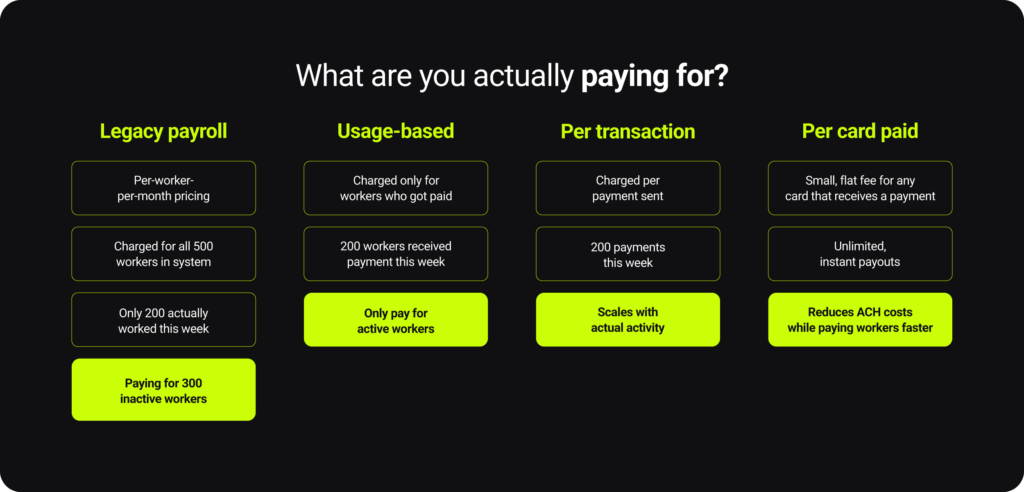
Your costs should flex the same way your workforce does. If you’re paying for every name in your database instead of every person you actually paid, you’re subsidizing idle capacity. And at scale, that gets expensive fast. Look for a pricing structure that moves with your workforce, not against it.
No ghost worker fees
The right pricing model ties cost directly to pay activity. In practice, that usually shows up in one of two structures:
Per-paid-worker pricing
If you’re on per-worker pricing, make sure it’s based on workers who actually received payments, not everyone in the system. There’s a huge difference between “you have 500 workers in your system” and “you paid 200 workers this week.” If someone didn’t work and didn’t get paid, you don’t get charged. This matches how staffing actually works.
Per-transaction pricing
Instead of per-worker fees, you pay a small fee per payment. This works well for agencies with a lot of contractors or highly variable workforce activity. One payment = one fee, regardless of whether it’s that worker’s first payment or tenth payment that month.
Both models can work. What matters is that pricing scales with real payroll activity, not stored headcount.
Transparent pricing without hidden fees
Watch out for providers who advertise low per-worker rates but then add fees for: same-day ACH, off-cycle payments, corrections, tax filing, W-2s, 1099s, multiple EINs, or basically anything beyond the absolute basics. The actual cost ends up much higher than quoted. Also note that some providers offer “good” pricing for small volumes but charge dramatically more as you grow. Make sure pricing scales reasonably, not exponentially, as your agency succeeds.
No charges for inactive periods
Workers who are in your system but didn’t work shouldn’t generate fees. Period. You should be able to keep workers in your system indefinitely without financial penalty.
7. Cash flow support for working capital gaps
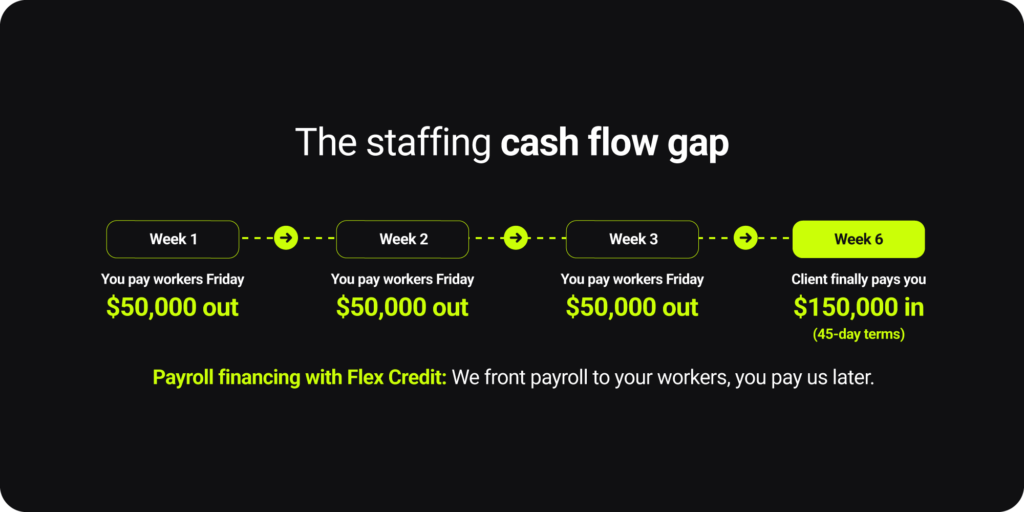
“Payroll’s due but clients haven’t paid yet.”
This is the reality of staffing: your workers need to be paid Friday, but your client is on 45-day payment terms (or longer). You’re stuck fronting payroll costs with your working capital, often for hundreds of thousands of dollars each week. Unfortunately, growing agencies face the biggest squeeze. When you’re landing new clients and taking on more workers, you’re funding more payroll before receiving more revenue. Growth shouldn’t mean a cash flow crisis, but that’s exactly what happens.
Most payroll companies treat this as “not their problem.” You’re expected to maintain enormous cash reserves, max out lines of credit, or use factoring services, which is expensive and complicated. Traditional staffing factoring services can charge 3-5% of invoice value, plus fees. They often want control of your entire accounts receivable process. And they’re separate vendors you need to manage alongside your payroll provider.
How staffing payroll funding for staffing companies should work
The best solution is when your payroll company offers to front payroll costs directly. They pay your workers immediately, and you pay them back on an agreed schedule (often when your client pays you). This eliminates the need for separate factoring relationships.
Staffing payroll financing should cost 1.5-3% depending on repayment terms, not 5%+. Make sure you understand exactly what it costs, you’re not paying hidden fees, and you have flexible repayment schedules. You should be able to choose repayment terms (7 days, 15 days, 30 days, etc.) based on your actual client payment cycles. Rigid terms don’t help.
Unlike traditional factoring, good payroll financing should let you maintain relationships with your clients and control your own invoicing and collections. The payroll company is funding the payroll, not taking over your entire accounts receivable process.
Lastly, cash flow gaps don’t wait for underwriting committees. When you need cash flow support, you need it now—not after weeks of paperwork and financial reviews. Look for providers who can approve credit lines quickly based on reasonable business fundamentals.
How staffing agencies bridge the cash flow gap in the real world
One home health agency said: “We need a system that can flex with our cash flow… the insurance reimbursements always come in late.” They specifically wanted confidence that payroll financing would “support same-day or instant pay without depending on immediate reimbursement.”
One agency told us: “Handling payroll during cash flow gaps is our biggest problem. If you can front payroll and let us settle later, that’s huge value.”
One home care payroll provider specifically sought “strong interest in credit offerings to address cash flow delays in healthcare payroll.”
Platforms like Everee offer Everee Credit, a payroll financing option built directly into the platform. Here’s how it works:
- Everee fronts the money to pay your workers immediately
- You settle with Everee on terms that match your client payment schedule (typically 15-30 days)
- Rates range from about 1.5-2.5% depending on repayment timeline
- You maintain control of your client relationships and AR process
- Access is usually approved within days based on business review, not months
The goal is simple: workers get paid on time, you manage cash flow smoothly, and you don’t need separate expensive factoring relationships.
How staffing agencies bridge the cash flow gap in the real world
One home health agency said: “We need a system that can flex with our cash flow… the insurance reimbursements always come in late.” They specifically wanted confidence that payroll financing would “support same-day or instant pay without depending on immediate reimbursement.”
One agency told us: “Handling payroll during cash flow gaps is our biggest problem. If you can front payroll and let us settle later, that’s huge value.”
One home care payroll provider specifically sought “strong interest in credit offerings to address cash flow delays in healthcare payroll.”
Platforms like Everee offer Everee Credit—a payroll financing option built directly into the platform. Here’s how it works:
- Everee fronts the money to pay your workers immediately
- You settle with Everee on terms that match your client payment schedule (typically 15-30 days)
- Rates range from about 1.5-2.5% depending on repayment timeline
- You maintain control of your client relationships and AR process
- Access is usually approved within days based on business review, not months
The goal is simple: workers get paid on time, you manage cash flow smoothly, and you don’t need separate expensive factoring relationships.
How to switch payroll software for staffing company
You’re convinced your current payroll situation isn’t working. Now what? Follow this step-by-step process for evaluating payroll providers and making a decision that actually improves your business.
Step 1: Map your actual pain points
Don’t start with features. Start with problems. What’s actually broken?
- Slow pay that’s hurting your ability to hire?
- Manual time entry that takes your team hours every week?
- Multi-state compliance that keeps you up at night?
- Payroll pricing that doesn’t match your variable workforce?
- Cash flow constraints when clients pay slowly?
- Workers calling constantly about missing payments or wrong calculations?
Write down the top three things that are genuinely painful right now. These become your priorities when researching options.
Step 2: Look for solutions that actually exist, not promises
Pay attention to what providers can do today versus what they promise for “the roadmap.” Ask specific questions.
- “Which ATS platforms do you integrate with right now?”
- “Can I see a demo of how multi-state leave policies work”
- “What’s your actual response time when we have payroll issues?”
- “Can you show me exactly how workers onboard in your system?”
Step 3: Test with a pilot if possible
The best payroll providers will let you test before fully committing.
- Running one entity on the new platform first
- Using a sandbox environment to see the actual system before going live
Recruiting agencies that did pilots consistently told us: “We wanted to test with a small group before scaling” and “Being able to run a pilot removed risk from the evaluation.”
respond quickly?” “Were there surprise costs?” “What doesn’t work as well as advertised?”
Step 4: Plan the migration carefully
Switching payroll providers is never trivial. Your new payroll provider should walk you through everything.
- Historical data migration (year-to-date earnings, tax withholdings)
- Worker onboarding and communication
- Parallel runs to verify accuracy if needed
- Support during the first few live payrolls
- Client communication if your payroll processes affect them
Good providers will have an implementation team and a structured process. Be wary of providers who say “just sign up and start using it tomorrow.”
Step 5: Calculate total cost of ownership
Don’t just compare per-worker pricing. The real cost of payroll in staffing goes far beyond the base fee.
- Setup and implementation fees
- Ongoing software costs (per worker, per transaction, minimums)
- Support costs (is it included or extra?)
- Integration and API costs
- Fees for features you’ll actually use (same-day pay, off-cycle payments, multiple EINs)
- Hidden costs in your current system (time spent on manual work, errors, compliance risks)
The cheapest option isn’t always the best value. One agency told us: “This is more of a service driven decision than a price driven decision for us.”
7 steps to make the switch
Step 1: Identify your top 3 pain points.
Is it slow pay? Multi-state compliance? Integration with your ATS? Cash flow? Pricing that doesn’t match your business? Write them down.
Step 2: Research providers and their capabilities.
Don’t accept vague answers about integration, compliance, or support. Ask for specifics and proof.
Step 3: Test with a pilot.
See if you can pilot the platform with a small group before committing fully.
Step 4: Ask for references of similar agencies.
Talk to your peers and ask about real experiences, not just what the marketing says.
Step 5: Plan the migration.
Give yourself time to implement properly, migrate data, onboard workers and verify accuracy.
Step 6: Understand your all-in cost.
Review your pricing and don’t fall for hidden fees.
What’s next for staffing company payroll software
Looking ahead, several trends are reshaping payroll for staffing agencies:
Real-time pay is becoming the baseline
Same-day pay is already expected in healthcare and light industrial staffing. Within two years, it will be table stakes across all staffing verticals. Workers increasingly expect to be paid when work is complete, not based on arbitrary pay cycles.
Embedded payroll is replacing standalone systems
Staffing agencies are moving toward unified platforms where payroll, time tracking, onboarding, and scheduling live in one experience. Standalone payroll systems that require separate logins and manual data transfer are becoming obsolete.
Compliance automation is getting smarter
Multi-state tax calculation, leave policy management, and overtime rules are becoming more complex. The payroll providers that succeed will handle this complexity automatically, using services that stay updated with regulatory changes across all jurisdictions.
Cash flow solutions are being built into payroll
Separating payroll from working capital management doesn’t make sense. Expect more payroll providers to offer integrated financing solutions that let agencies pay workers immediately while managing client payment timing.
White-label capabilities are expanding
Staffing platforms and larger agencies want to offer payroll under their own brand. Payroll providers that support true white-labeling, embedded components, and flexible APIs will win this market.
Everee: built for staffing from the ground up
Throughout this guide, we’ve used Everee as an example of how staffing payroll should work. That’s because Everee was built specifically for the staffing industry, solving the exact problems described in this guide.
Here’s what that means:
Real-time payroll built into the platform. Same-day ACH, instant pay cards, and flexible payment options aren’t add-ons; they’re core to how Everee works. Workers can get paid daily, weekly, or ad hoc based on what makes sense for your business.
Multi-state compliance automated at the shift level. Set a location for each shift, and Everee automatically calculates state and local taxes, overtime rules, and leave policies based on where the work happened. Works across all 50 states with automated tax filing.
Integrations with leading staffing platforms. Everee integrates directly with LaborEdge, Bullhorn, NextCrew, ActivateStaff, StaffingOS, and other staffing platforms. Two-way data sync eliminates manual work.
Usage-based pricing for variable workforces. Choose per-paid-worker pricing or per-transaction pricing. No charges for inactive workers.
Built-in cash flow support. Flex Credit fronts payroll costs so you can pay workers immediately even when clients haven’t paid you yet. Flexible repayment terms and transparent rates.
Dedicated support for staffing agencies. Assigned onboarding and support representatives who learn your business. 30-minute response guarantee for urgent issues.
Enhanced onboarding with mobile-first experience. E-Verify integration, remote I-9 verification options, personalized document packages by role and location, and multi-language support.
API access and embedded components. For agencies building platforms or wanting custom integration, Everee offers strong APIs, embeddable UI components, and sandbox environments for testing.
Ready to see how Everee works for staffing agencies like yours? Book a demo to see the platform in action and discuss your specific needs.
Not happy with your current payroll provider? You’re not alone. Staffing agencies are making the switch to payroll built for their business model, not adapted from corporate HR software.Let’s talk about what that could look like for your agency.